Why protein-ligand interaction visualization matters
Protein-ligand interaction visualization sits at the intersection of structural biology, medicinal chemistry and scientific communication. A reviewer may only spend a few seconds on your first figure before deciding whether the binding story is easy to follow. If the ligand is buried in a noisy surface render or surrounded by labels that fight for space the scientific value is harder to see even when the structure itself is strong.
The goal is not to make a pretty screenshot. The goal is to make the binding mode legible. Readers should be able to answer four questions fast: what ligand is bound, where it binds, which residues matter and why that interaction supports your claim. That applies whether you are building a ligand binding site figure for a manuscript, a protein ligand interaction diagram for a slide deck or a drug binding visualization for a grant proposal.
Official RCSB guidance on ligands emphasizes that exploring ligand location and interactions helps explain biomolecular function and informs design decisions. Their ligand resources also stress comparing multiple structures of the same ligand to select the best example for analysis and visualization. That point is often missed. Many weak figures start with a mediocre structure choice rather than a rendering problem.
If you are presenting the result beyond a static panel the same thinking scales into motion. A short camera move or pocket reveal can clarify orientation far faster than three separate stills. For related communication formats see https://animiotics.com/blog/the-rise-of-the-video-abstract-why-your-next-paper-needs-a-trailer-2026-guide/ and https://animiotics.com/blog/how-to-create-a-3d-graphical-abstract-for-nature-and-cell-2026-guide/.
- Use visualization to answer a scientific question rather than to display every atom.
- Prioritize binding mode clarity before styling.
- Treat structure selection as part of figure design.
Start with the right ligand-bound structure
A strong ligand-bound structure tutorial always begins before any color choice. You need the right model. The PDB now provides more support for assessing ligand quality than many researchers realize. The PDB-101 training on high-quality ligand-bound structures highlights practical criteria such as validation metrics, comparison across entries and searching for better examples of the same ligand in the archive.
In practice that means you should resist the urge to use the first structure you fetched. Check resolution, alternate conformations, occupancy and whether the ligand of interest is the biologically relevant one. If several entries exist compare how complete the local pocket is and whether flexible loops that shape the site are resolved. A figure built from the cleanest complex nearly always needs less rescue work later.
This step is especially important for drug binding visualization. Medicinal chemistry readers care about hydrogen bonds, hydrophobic packing and steric fit but they also care whether the structure plausibly supports those claims. If the ligand density is weak or the pocket is partially disordered a polished image can still feel unconvincing. Better to acknowledge limits and choose a structure that genuinely supports interpretation.
A useful habit is to save a short selection note beside every candidate complex. Record the PDB ID, biological relevance, chain choice and reason for inclusion. That discipline makes later figure revisions faster and helps you defend your choice during peer review or internal discussion.
- Check ligand validation and pocket completeness before rendering.
- Compare multiple entries for the same ligand when possible.
- Document why a specific complex is the visual reference.
| Decision point | What to check | Why it matters |
|---|---|---|
| Ligand quality | Occupancy fit and geometry | Weak ligand models produce misleading interaction claims |
| Pocket completeness | Resolved side chains loops and cofactors | Missing local structure hides true contacts |
| Biological relevance | Correct target state and ligand identity | A clean figure can still tell the wrong story |
Design a ligand binding site figure that reads in seconds
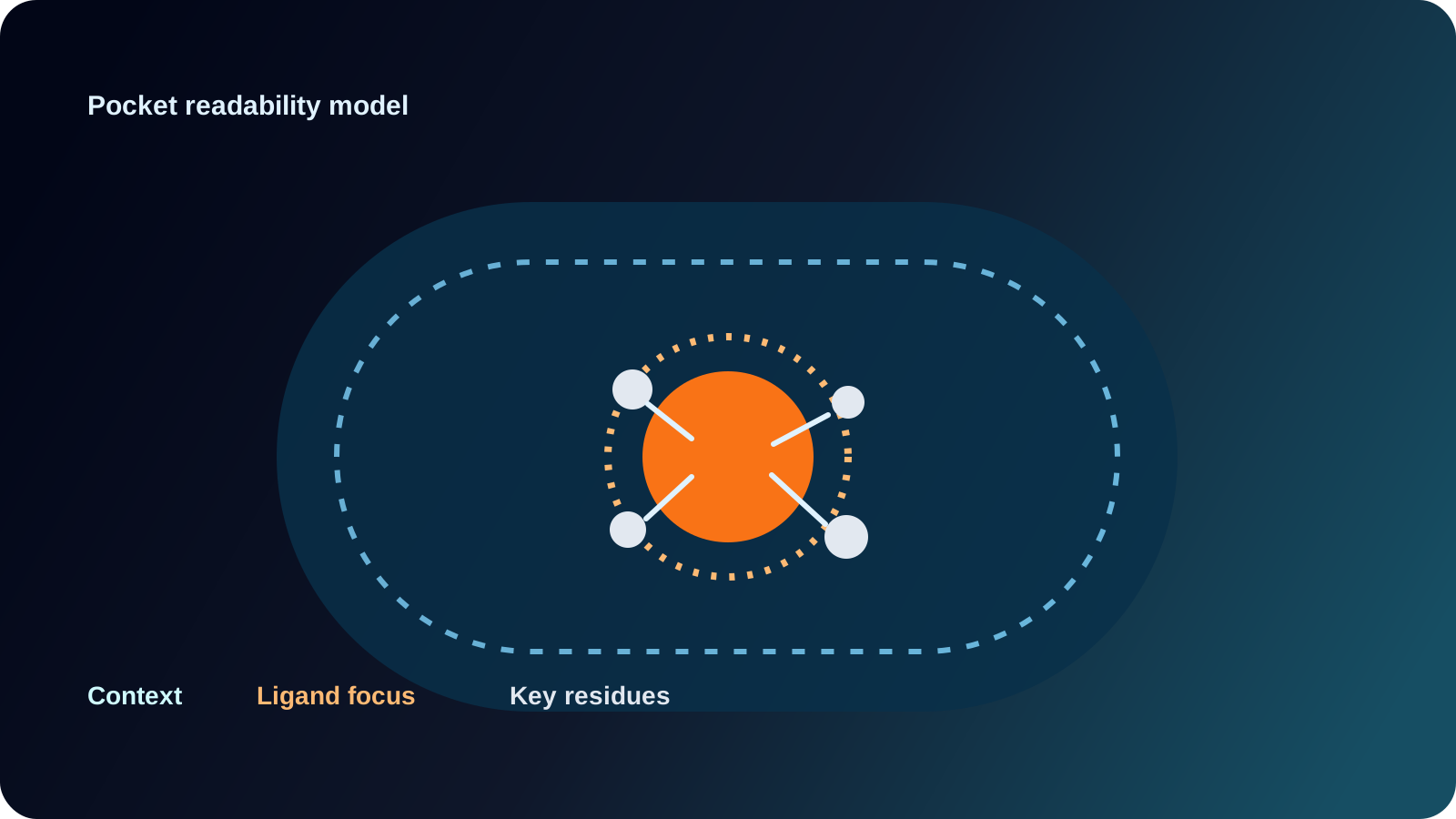
A good ligand binding site figure uses hierarchy. The protein provides context. The ligand provides focus. Key residues provide interpretation. Everything else is secondary. Most failed figures reverse that order by showing the entire protein in equal visual weight. Instead crop aggressively around the pocket for the main panel then add a small inset for whole-protein orientation if needed.
Representation choices should support that hierarchy. Cartoon for the overall fold works well in context views. Sticks for the ligand and contacting residues usually carry the local story. A semi-transparent surface can define pocket shape but it should not obscure residue chemistry. If you show the surface color it by property or by proximity only when that encoding adds meaning. Otherwise keep it quiet.
Color discipline matters more than brand style. Use one consistent color for the ligand across all panels. Keep the protein neutral and reserve accent colors for interaction classes or mutated residues. If every residue type gets a different hue the image becomes decorative rather than explanatory. Labels should be few, placed outside the pocket when possible and aligned to a reading path that does not cross the ligand.
For manuscripts combine 3D structure and simplified 2D communication. A protein ligand interaction diagram can sit beside the 3D panel to summarize hydrogen bonds pi stacking salt bridges and water-mediated contacts. That pairing is effective because the 3D panel shows spatial truth while the diagram shows logic. If you are also building broader grant visuals see https://animiotics.com/blog/5-tips-for-designing-grant-winning-figures-for-nih-and-nsf/ for communication choices that hold up under fast review.
- Crop to the pocket for the main panel.
- Use one ligand color throughout the figure set.
- Add only the residues that advance the binding argument.
- Pair a 3D view with a simplified interaction summary when space allows.
A practical protein ligand interaction visualization workflow
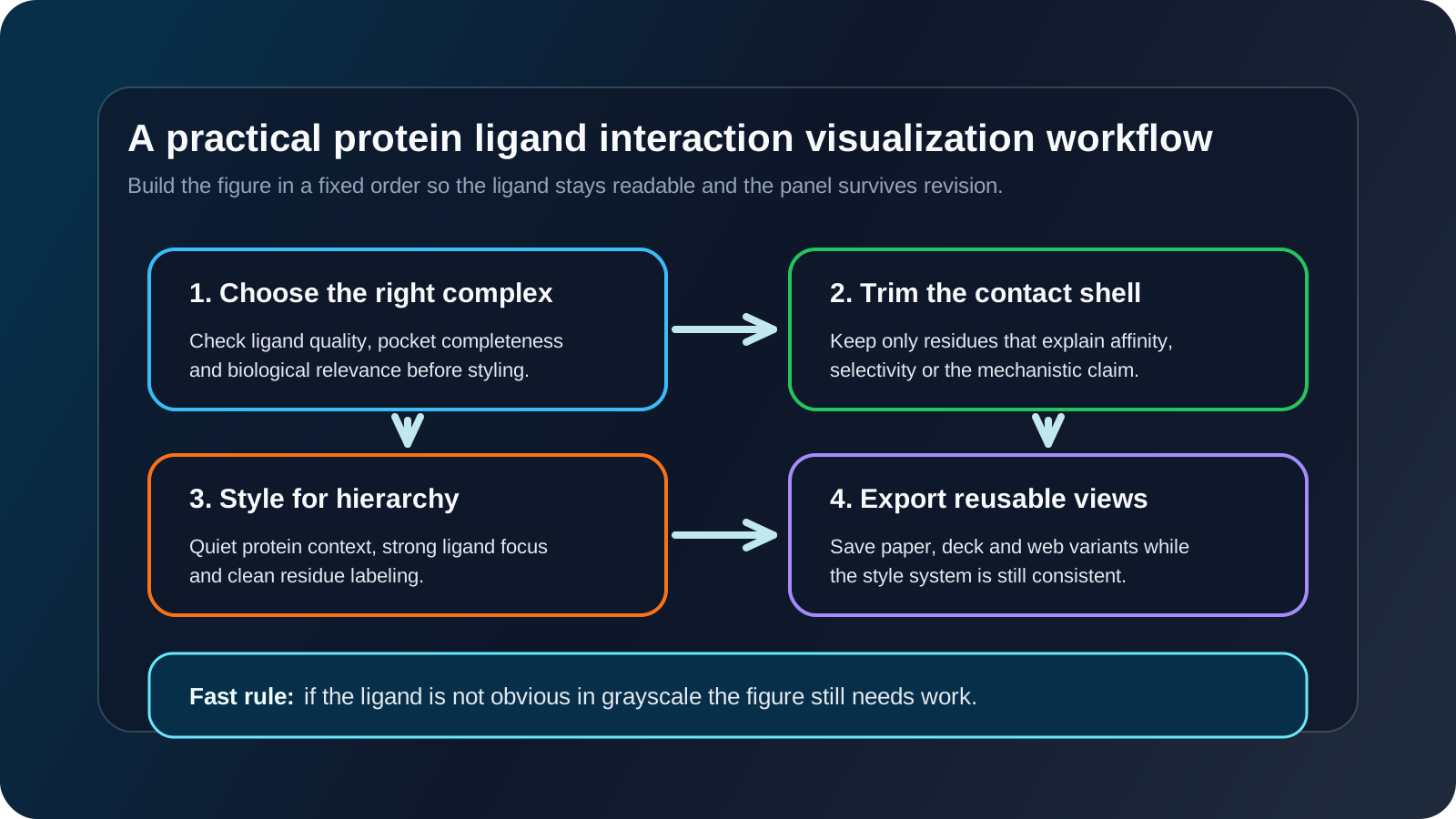
A repeatable workflow reduces overediting. Step one is import and cleanup. Load the complex, remove nonessential solvent, choose the biologically relevant chain and normalize naming so exported assets stay organized. Step two is create two saved views: a whole-structure orientation and a pocket close-up. This simple move prevents accidental drift when you iterate on labels or surfaces.
Step three is define the contact shell. Select residues within a rational cutoff around the ligand then manually trim that set. Automatic distance selections are a starting point not the final figure. A contact shell of fifteen residues may be correct for analysis but only six may belong in the image. Step four is assign visual roles. Protein context in cartoon. Binding residues in sticks. Ligand in thicker sticks or ball-and-stick if the chemistry benefits from it. Surface only if pocket topology needs emphasis.
Step five is test communication with a grayscale export. If the focal point disappears without color the composition is not strong enough yet. Step six is create one supporting derivative. That might be a top-down pocket shot, an exploded residue view or a simplified protein ligand interaction diagram. The derivative view often becomes the panel that saves the figure during revision.
If you need motion the same logic extends well into PyMOL or animation software. The PyMOL moviemaking tutorial shows how separating ligand and protein objects supports simple dissociation or conformational storytelling. That is useful for a ligand-bound structure tutorial video, a conference loop or a product page. If you want a broader motion-first pipeline compare workflows in https://animiotics.com/blog/how-to-create-a-mechanism-of-action-moa-animation-without-a-20000-budget-2026-guide/ and https://animiotics.com/blog/animiotics-scientific-3d-animation-software/.
- Save whole-structure and pocket views early.
- Use automatic contact shells then trim manually.
- Test in grayscale before final export.
- Create one derivative view for revision resilience.
| Workflow step | Main output | Common failure |
|---|---|---|
| Cleanup | Consistent model and chain choice | Leaving irrelevant atoms that clutter the pocket |
| Contact selection | Focused residue set | Showing every nearby residue |
| Styling | Clear hierarchy of context and focus | Overusing bright colors or opaque surfaces |
| Export | Reusable panels for paper and slides | Only saving one angle at one resolution |
Common mistakes in drug binding visualization
The most common mistake is trying to show too much. Structural biologists often know the pocket so well that they forget the audience does not. A dense image with many labels, several surfaces and full-protein context can feel comprehensive but it slows interpretation. The better choice is usually one main claim per panel.
A second mistake is implying certainty beyond the data. Dashed lines for every potential interaction can suggest a level of precision the structure does not support. Show interactions that matter to your argument and that are geometrically credible. If a water bridge or flexible side chain is provisional say so in the caption rather than hiding uncertainty behind visual confidence.
A third mistake is inconsistent ligand treatment across panels. If the ligand is cyan in one figure, green in another and outlined differently in a third readers lose tracking. Consistency becomes even more important when you compare analogs, mutants or apo versus bound states. Create a small style guide for the project and apply it everywhere.
The final mistake is stopping at screenshots when the communication need is actually narrative. If your message depends on entry into the pocket, induced fit or comparison across states then a static panel may be doing too much work. In those cases a short animated reveal or interactive sequence is more honest and often more efficient.
- Do not overload one panel with every contact.
- Avoid decorative interaction lines that do not support the claim.
- Keep ligand color and representation consistent across all outputs.
- Use motion when the scientific story depends on sequence or conformational change.
FAQ
What is the best tool for protein ligand interaction visualization?
AThe best tool depends on your output. PyMOL is widely used for quick figure generation and simple motion studies. ChimeraX is strong for modern structural exploration and binding site inspection. RCSB resources are valuable for selecting better ligand-bound structures before you render anything. The best pipeline is often a combination rather than a single app.
How do I make a better protein ligand interaction diagram for publication?
AStart by choosing one message. Then reduce the scene to the ligand, the pocket and a small set of residues that explain affinity or selectivity. Use consistent ligand coloring and avoid labels that overlap the binding site. A separate 2D interaction summary can help when the 3D view becomes crowded.
What should a ligand-bound structure tutorial include for new lab members?
ACover structure selection, ligand quality checks, residue cutoff choices, representation hierarchy, export settings and how to compare multiple PDB entries. Many tutorials start too late by focusing only on rendering commands. The quality decision at the beginning often matters more than the final style preset.
When should I use a surface in a ligand binding site figure?
AUse a surface when pocket shape, enclosure or solvent exposure is scientifically relevant. Keep it semi-transparent or tightly cropped. Skip it when it hides residue chemistry or turns the image into a solid mass around the ligand.
- Choose tools based on output format rather than habit.
- Teach structure selection before styling commands.
- Use surfaces selectively when topology adds meaning.
CTA: Build clearer binding visuals with Animiotics
If your team needs protein-ligand interaction visualization that is accurate, fast to revise and ready for papers, pitches or product storytelling Animiotics can help. The platform is built for scientific 3D communication so you can turn a ligand-bound structure tutorial into polished figures, explain a drug binding visualization in motion and create assets that stay consistent across manuscript, website and investor materials.
Visit the Animiotics home page if you want to build ligand binding site figures and protein ligand interaction diagrams with a workflow designed for scientific communication rather than generic graphics. Start with one structure, define the binding story and turn it into visuals that readers can understand on first pass.
- Create publication-ready pocket views faster.
- Keep ligand style consistent across figures and motion assets.
- See how Animiotics works on the main page.